OpenClaw delivers proactive morning briefings via Telegram using a file-based Markdown workspace for
Personal Assistant📅 2026/03/20

#Documentation#Fully Automatic#Individual User#Medium Risk#Reusable#Scheduled Run#Telegram#提醒#效率工具#自主代理
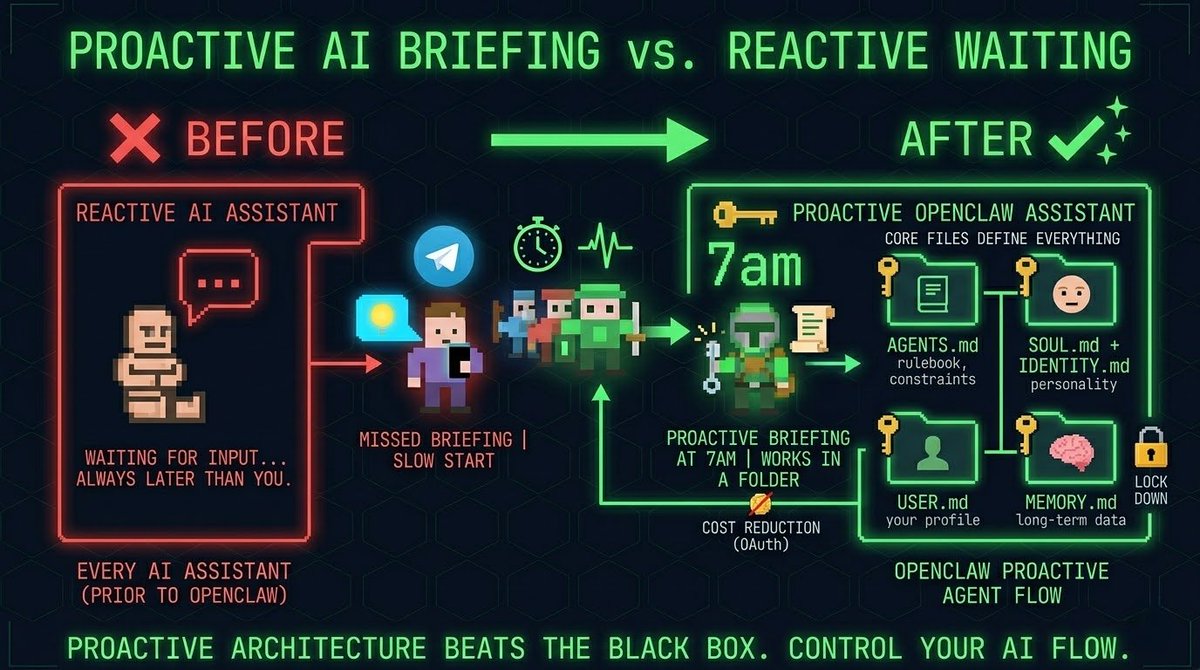
Every AI assistant I've tried waits for input. OpenClaw sent me a Telegram message at 7am with my briefing before I touched my phone.

> The brain is a folder.
Workspace is a directory of plain Markdown files you can open and edit anytime.

Five files run everything:

agents.md - the rulebook. Hard limits, operating instructions. "Never send emails without my approval". This is what keeps the agent from going rogue.

soul.md + identity.md - personality, tone, even which emoji it uses.

user.md - your profile. Projects, timezone, the fact that you dictate messages with typos.

memory.md - long-term memory. When context overflows, the agent compresses old conversations and saves what matters here.

Agentic loop: you give one task, it runs until done. Hits an error, fixes it, keeps going.

Heartbeat: every 30 minutes Gateway wakes the agent and runs through heartbeat.md - check email, check calendar, check whatever you defined.

Cron jobs: briefing at 7:00am sharp, weekly audit every Friday. Set once, runs forever.

> Cutting costs: OAuth vs API.
Every request reloads all instruction files into memory. Pay per token and it burns fast.

Connect via OAuth - ChatGPT Plus subscription and you get unlimited usage at a flat monthly rate. OpenAI allows it. Google will ban u.

Lock it down.
openclaw.json in the root folder. Hard restrictions: block browser access, disable file deletion, limit what it can touch.

Set a cron for regular security audits.
Access without restrictions is a liability.